Physical Address
Arthur Avenue , BrookField , ILLINOIS , 60513 , United State
Physical Address
Arthur Avenue , BrookField , ILLINOIS , 60513 , United State

Last Updated: July 2026
| Quick Information | |
|---|---|
| Software Name | Hyundai HCE-DT (Hyundai Construction Equipment Diagnostic Tool) |
| Developer | HD Hyundai Construction Equipment |
| Category | Official OEM Dealer Diagnostic Software |
| Primary Purpose | Electronic Diagnostics, ECU Programming, Machine Configuration, Troubleshooting and Maintenance |
| Supported Equipment | Excavators, Wheel Loaders, Forklifts, Material Handling Equipment and Selected Hyundai Construction Machines |
| Communication | CAN Bus, SAE J1939, ISO 15765, USB VCI, Proprietary Hyundai Communication |
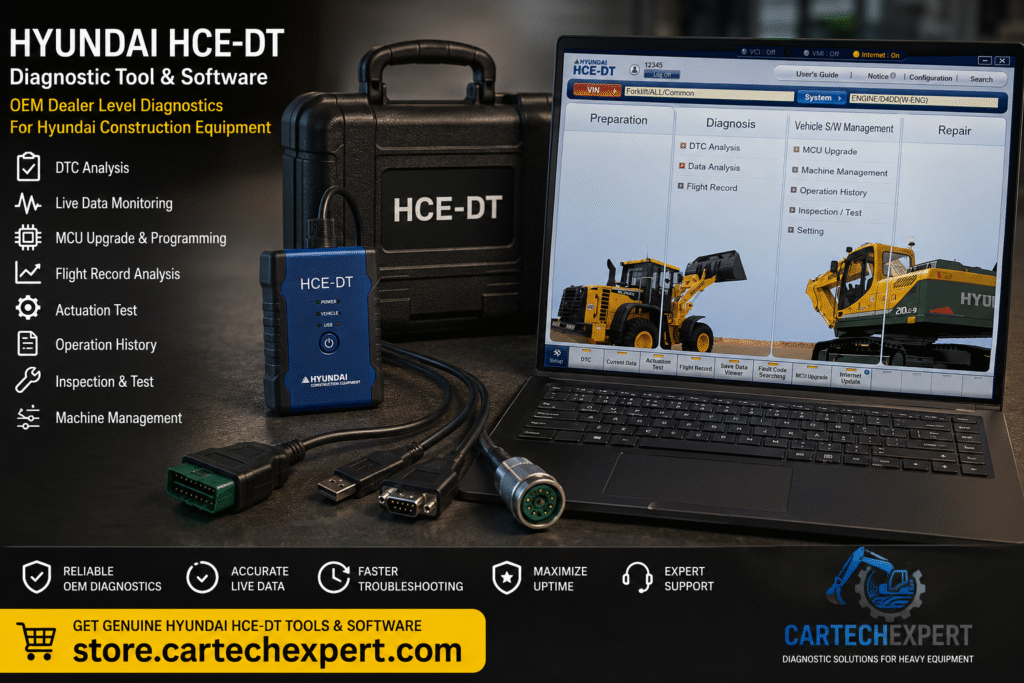
Hyundai HCE-DT (Hyundai Construction Equipment Diagnostic Tool) is the official OEM diagnostic software used by HD Hyundai Construction Equipment dealers and authorized service centers. The application provides complete dealer-level access to electronic control systems installed on Hyundai construction machinery, enabling technicians to diagnose faults, monitor live operating data, configure controllers, perform software updates and maintain modern electronically controlled equipment.
Today’s Hyundai excavators, wheel loaders, forklifts and material handling machines integrate multiple Electronic Control Units (ECUs) responsible for engine management, hydraulics, transmission, safety systems and emissions control. HCE-DT communicates directly with these controllers through the official Vehicle Communication Interface (VCI), providing factory-level diagnostic capabilities.
HCE-DT is Hyundai Construction Equipment’s integrated diagnostic environment developed specifically for dealer workshops and field service engineers. The software combines diagnostics, live monitoring, machine configuration, controller programming and maintenance functions within a single interface.
The graphical interface is organized into logical service modules that simplify troubleshooting while providing technicians with complete access to machine electronic systems.
The HCE-DT home screen is divided into several service sections including Preparation, Diagnosis, Vehicle Software Management and Repair. Navigation tabs provide access to DTC analysis, current data, actuation tests, flight records, fault code searching, MCU upgrades and internet updates.
| Machine Category | Coverage |
|---|---|
| Crawler Excavators | HX Series |
| Compact Excavators | R Series |
| Wheel Excavators | HW Series |
| Wheel Loaders | HL Series |
| Forklifts | Diesel & Electric Models |
| Material Handling Machines | Supported Models |
| Industrial Equipment | Selected Models |
HCE-DT automatically identifies compatible machines using the Vehicle Identification Number (VIN) or machine information. Once connected, the software retrieves the installed controller configuration and machine specifications before beginning diagnostics.
The DTC Analysis module retrieves active, stored and historical Diagnostic Trouble Codes from every supported controller. Fault descriptions, controller information and service guidance help technicians identify failures quickly while minimizing unnecessary parts replacement.
Live machine parameters are displayed in real time, allowing technicians to monitor engine, hydraulic and electrical systems while the machine is operating.
The Data Analysis module organizes diagnostic information into graphical displays and parameter lists, allowing service engineers to compare machine performance against factory specifications and quickly identify abnormal operating conditions.
Flight Record stores operational data during machine operation. Technicians can replay recorded events to investigate intermittent failures, operator complaints and abnormal machine behavior that may not be present during workshop inspection.
The Actuation Test function allows technicians to activate individual components directly from the software. Typical tests include cooling fans, solenoid valves, relays, hydraulic actuators, warning lamps and electronic outputs.
Vehicle Software Management provides access to controller configuration, machine software management and electronic customization according to Hyundai service procedures.
Authorized users can perform MCU (Machine Control Unit) software updates to install approved firmware revisions, improve machine performance and correct known software issues.
Machine Management maintains controller information, machine configuration data and diagnostic records throughout the equipment lifecycle.
Operation History records machine usage, operating hours, service intervals and previous maintenance activities, allowing technicians to evaluate machine condition before repairs are performed.
The Inspection & Test module assists technicians with preventive maintenance by verifying controller operation, sensor performance and machine functionality using standardized OEM inspection routines.
Hydraulic diagnostic functions include pump pressure analysis, pilot circuit monitoring, proportional valve testing, boom speed analysis, travel motor diagnostics and hydraulic calibration procedures. These capabilities help technicians identify hydraulic performance issues while minimizing unnecessary component replacement.
Engine diagnostics provide comprehensive monitoring of electronically controlled diesel engines, including fuel injection systems, turbocharger operation, cooling systems, common rail pressure, engine sensors and operating performance.
Supported machines equipped with modern emission systems can be diagnosed using HCE-DT, including SCR, DEF dosing, DPF regeneration, EGR monitoring and exhaust aftertreatment troubleshooting.
Hyundai HCE-DT (Hyundai Construction Equipment Diagnostic Tool) is the official OEM dealer software used to diagnose, configure and maintain Hyundai construction equipment.
Yes. Hydraulic diagnostics include pressure monitoring, pump analysis, proportional valve testing and calibration procedures.
Flight Record stores machine operating data for later analysis, allowing technicians to diagnose intermittent problems and review machine behavior over time.
Yes. Authorized service engineers can update compatible Machine Control Units (MCUs) using the Vehicle Software Management module.
Yes. The software supports numerous Hyundai construction equipment categories, including excavators, wheel loaders and additional compatible machines.
Hyundai HCE-DT is the official dealer diagnostic platform for HD Hyundai Construction Equipment. Combining advanced diagnostics, controller programming, software management, hydraulic analysis, live monitoring and machine configuration in a single application, HCE-DT enables professional technicians to maintain modern Hyundai construction equipment with maximum efficiency, reliability and accuracy. For dealer workshops and fleet maintenance operations, it remains an essential OEM solution for reducing downtime and ensuring peak machine performance.
