Physical Address
Arthur Avenue , BrookField , ILLINOIS , 60513 , United State
Physical Address
Arthur Avenue , BrookField , ILLINOIS , 60513 , United State

Last Updated: July 2026
| Quick Information | |
|---|---|
| Software Name | Hitachi MPDr (Machine Performance Doctor) |
| Developer | Hitachi Construction Machinery Co., Ltd. |
| Category | Official OEM Dealer Diagnostic Software |
| Primary Purpose | Electronic Diagnostics, ECU Programming, Hydraulic Calibration, Troubleshooting and Machine Performance Analysis |
| Supported Equipment | Hitachi Excavators, Mining Excavators, Wheel Loaders, Dump Trucks, Crawler Carriers and Road Construction Equipment |
| Communication | CAN Bus, SAE J1939, K-Line, USB Communication Adapter, Proprietary Hitachi Communication |
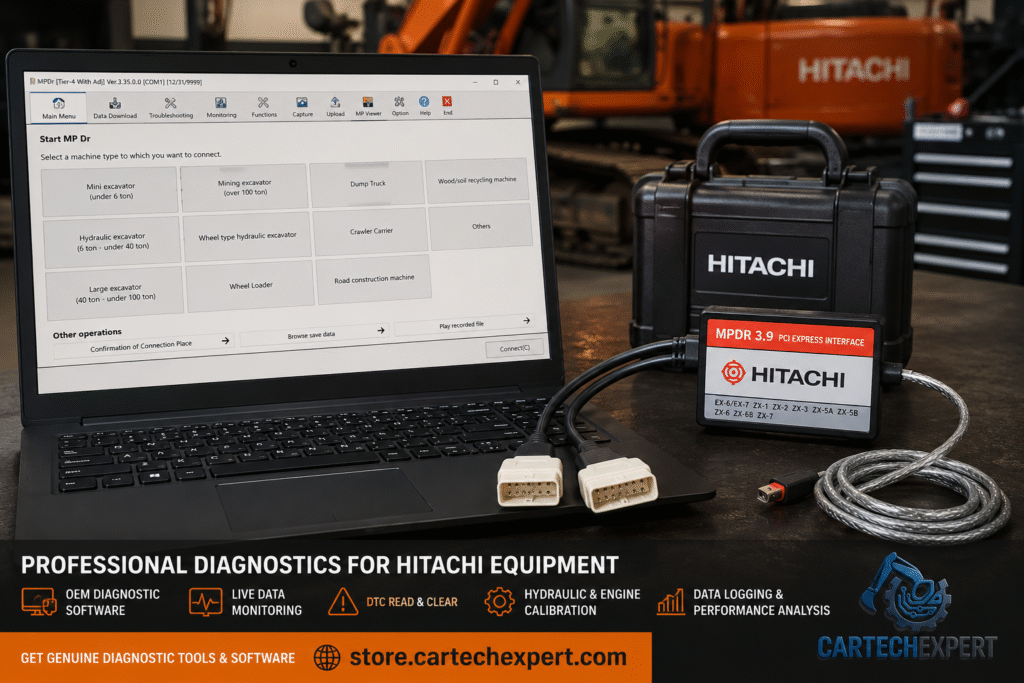
Hitachi MPDr (Machine Performance Doctor) is the official OEM diagnostic software used by Hitachi Construction Machinery dealers and certified service engineers. The software provides comprehensive access to the electronic control systems installed on modern Hitachi construction, mining and material handling equipment, allowing technicians to diagnose faults, monitor machine performance, perform calibrations and configure electronic controllers.
Modern Hitachi machines contain multiple electronic control units responsible for engine management, hydraulic systems, travel functions, safety systems, machine monitoring and emissions control. MPDr communicates directly with these controllers, providing dealer-level diagnostic capabilities unavailable through universal diagnostic tools.
Machine Performance Doctor (MPDr) is Hitachi Construction Machinery’s integrated diagnostic platform designed for servicing electronically controlled equipment. Using the official Hitachi communication interface, technicians can retrieve Diagnostic Trouble Codes (DTCs), analyze machine performance, perform hydraulic calibrations, monitor live operating values and execute maintenance procedures according to OEM specifications.
As Hitachi transitioned from mechanically controlled hydraulic equipment to electronically managed construction machinery, MPDr evolved into the standard dealer software for diagnostics and maintenance. The platform supports both conventional construction equipment and large mining machinery equipped with advanced electronic control systems and emissions technologies.
| Equipment Category | Coverage |
|---|---|
| Mini Excavators | Under 6 Ton |
| Hydraulic Excavators | 6–40 Ton |
| Large Excavators | 40–100 Ton |
| Mining Excavators | Over 100 Ton |
| Wheel Excavators | Supported Models |
| Wheel Loaders | ZW Series |
| Rigid Dump Trucks | EH Series |
| Crawler Carriers | Supported Models |
| Road Construction Equipment | Selected Models |
| Wood & Recycling Equipment | Supported Machines |
The MPDr interface is organized into functional modules including Main Menu, Data Download, Troubleshooting, Monitoring, Functions, Capture, Upload, MP Viewer, Options and Help. Machine categories are selected before establishing communication, ensuring that the correct diagnostic routines are loaded for each equipment type.
The Data Download module retrieves machine operating information stored inside electronic controllers. Technicians can review operating hours, fault histories, maintenance records and historical operating conditions to assist with troubleshooting and preventive maintenance.
MPDr guides technicians through systematic troubleshooting procedures by combining Diagnostic Trouble Codes, live sensor values and OEM service information. This structured workflow reduces repair time and improves diagnostic accuracy.
Hundreds of machine parameters can be monitored in real time, including:
Machine Performance Doctor continuously evaluates hydraulic and engine performance. Technicians can compare measured values against factory specifications to determine whether pumps, valves or sensors are operating correctly.
Hydraulic diagnostics include pump pressure monitoring, pilot circuit analysis, proportional valve testing, actuator monitoring, boom speed analysis and hydraulic calibration procedures. These functions help identify internal hydraulic problems without unnecessary component replacement.
Engine diagnostics support common rail diesel systems, turbocharger monitoring, emissions control, EGR operation, aftertreatment diagnostics and fuel system analysis. The software provides live measurements and fault information directly from the engine ECU.
The Capture function records live machine operating parameters during work cycles. These recordings help technicians analyze intermittent failures, compare machine performance and document repairs for future reference.
MP Viewer allows technicians to replay recorded diagnostic sessions, review captured operating data and analyze machine performance without remaining connected to the equipment. This feature is particularly valuable for technical support and advanced troubleshooting.
Upload capabilities allow technicians to transfer calibration data, controller parameters and selected software information between the machine and the service computer while maintaining machine configuration records.
Depending on machine generation and authorization level, MPDr supports controller configuration, parameter updates, machine customization and software programming for compatible electronic control units.
MPDr stands for Machine Performance Doctor, Hitachi Construction Machinery’s official dealer diagnostic software.
Yes. Hydraulic diagnostics are one of the software’s primary capabilities, including pump analysis, pressure monitoring and calibration procedures.
Yes. The software supports construction excavators, mining excavators, wheel loaders, dump trucks and several other Hitachi machine categories.
Yes. The Capture and MP Viewer modules allow technicians to record, replay and analyze machine operating data.
Yes. As the official OEM platform, it provides manufacturer-specific diagnostics, calibration routines and performance analysis unavailable through most aftermarket diagnostic tools.
Hitachi MPDr (Machine Performance Doctor) is the official diagnostic platform for Hitachi Construction Machinery equipment. Combining advanced electronic diagnostics, hydraulic performance analysis, ECU programming, live monitoring and data recording into a single application, MPDr enables technicians to maintain modern Hitachi machines with maximum accuracy and efficiency. For dealers, fleet maintenance departments and professional workshops, it remains one of the most powerful OEM diagnostic solutions available for Hitachi construction and mining equipment.
