Physical Address
Arthur Avenue , BrookField , ILLINOIS , 60513 , United State
Physical Address
Arthur Avenue , BrookField , ILLINOIS , 60513 , United State

Last Updated: July 2026
| Quick Information | |
|---|---|
| Software Name | Takeuchi Service Tool |
| Developer | Takeuchi Manufacturing Co., Ltd. |
| Category | Official OEM Dealer Diagnostic Software |
| Primary Purpose | Electronic Diagnostics, ECU Communication, Hydraulic Calibration, Controller Programming and Maintenance |
| Supported Equipment | Takeuchi Compact Excavators, Compact Track Loaders, Wheel Loaders and Crawler Dumpers |
| Communication Interface | Takeuchi Diagnostic Adapter |
| Communication Protocols | CAN Bus, SAE J1939, ISO 15765, USB |
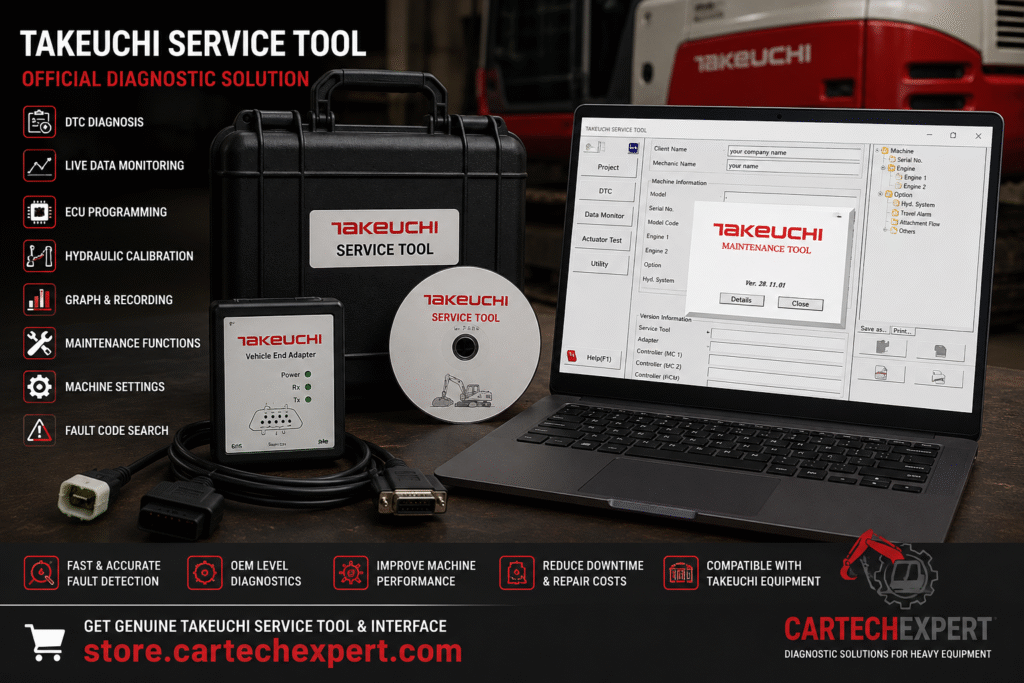
Takeuchi Service Tool is the official OEM diagnostic software used by Takeuchi dealers and authorized service technicians to diagnose, configure and maintain modern Takeuchi construction equipment. Connected through the official communication interface, the software provides direct access to machine electronic control units (ECUs), allowing technicians to read diagnostic trouble codes, monitor live operating data, perform hydraulic calibrations and update controller software.
Takeuchi machines are recognized worldwide for durability, compact design and reliable hydraulic performance. As these machines have evolved, electronic controllers now manage engine operation, hydraulic systems, safety features and emissions equipment. Takeuchi Service Tool provides factory-level access to these systems, improving troubleshooting accuracy while reducing machine downtime. :contentReference[oaicite:0]{index=0}
Takeuchi Service Tool is an integrated dealer diagnostic application developed specifically for Takeuchi construction equipment. It combines fault diagnosis, live parameter monitoring, calibration routines, controller configuration and software management into one professional service environment. It is intended for dealer workshops, fleet maintenance departments and qualified service engineers.
| Machine Category | Typical Models |
|---|---|
| Mini Excavators | TB210R, TB216, TB225, TB230, TB235-2, TB250-2, TB257FR, TB290-2 |
| Compact Track Loaders | TL6R, TL8R2, TL10V2, TL12V2 |
| Crawler Dumpers | TCR50-2, TCR50-3 |
| Wheel Excavators | TB370W |
| Wheel Loaders | Supported Regional Models |
The software communicates using the official Takeuchi diagnostic communication adapter connected through USB. The adapter provides secure communication with machine controllers while supporting programming, live diagnostics and service procedures.
After connection, the software automatically detects the machine, retrieves serial number information, controller software versions, operating hours and machine configuration before beginning diagnostics.
Takeuchi Service Tool retrieves active, inactive and historical Diagnostic Trouble Codes from compatible controllers. Detailed descriptions allow technicians to identify hydraulic, engine, electrical and communication faults efficiently.
Live parameters can be displayed graphically, enabling technicians to compare sensor values over time and diagnose intermittent hydraulic or engine problems during machine operation.
The hydraulic diagnostic module provides advanced analysis of pump performance, pilot circuits, proportional valves, auxiliary hydraulics and attachment flow. Calibration procedures restore hydraulic performance after component replacement.
Engine diagnostics include common rail fuel system monitoring, injector analysis, turbocharger performance, cooling system diagnostics and electronic sensor verification.
Machines equipped with Tier 4 Final or Stage V engines support diagnostics for SCR, DEF dosing, DPF regeneration and EGR systems, allowing technicians to troubleshoot emissions-related problems accurately.
Authorized service technicians can update ECU firmware, configure replacement controllers and synchronize machine parameters according to official Takeuchi service procedures.
Many current Takeuchi machines support Takeuchi Fleet Management (TFM), allowing remote monitoring of machine location, operating hours, maintenance intervals, fuel consumption and machine health. TFM also assists with remote diagnostics and predictive maintenance planning. :contentReference[oaicite:1]{index=1}
Yes. It is the OEM diagnostic platform used by authorized Takeuchi dealers and trained service technicians.
Yes. Authorized users can update software, configure replacement controllers and synchronize machine parameters.
Yes. Hydraulic pump calibration, joystick calibration and auxiliary hydraulic adjustments are supported.
Yes. Compatible machines support diagnostics for SCR, DPF, DEF and EGR systems.
Yes. Takeuchi Fleet Management (TFM) provides telematics, maintenance alerts, remote diagnostics and machine utilization reporting for supported equipment. :contentReference[oaicite:2]{index=2}
Takeuchi Service Tool is the official dealer diagnostic platform for maintaining modern Takeuchi construction equipment. Combined with the official communication interface, it provides advanced electronic diagnostics, hydraulic analysis, ECU programming, controller calibration and maintenance management. Together with Takeuchi Fleet Management (TFM), it enables workshops and fleet operators to reduce downtime, improve troubleshooting accuracy and keep machines operating at maximum efficiency. :contentReference[oaicite:3]{index=3}
