Physical Address
Arthur Avenue , BrookField , ILLINOIS , 60513 , United State
Physical Address
Arthur Avenue , BrookField , ILLINOIS , 60513 , United State

Last Updated: July 2026
| Quick Information | |
|---|---|
| Software Name | Challenger EDT (Electronic Diagnostic Tool) |
| Developer | AGCO Corporation – Challenger Agriculture |
| Category | OEM Dealer Diagnostic Software |
| Primary Purpose | Electronic diagnostics, ECU communication, calibration, troubleshooting and maintenance |
| Supported Equipment | Challenger Agricultural Equipment |
| Communication Protocols | CAN Bus, SAE J1939, ISO 11783 (ISOBUS), AGCO Proprietary Protocols |
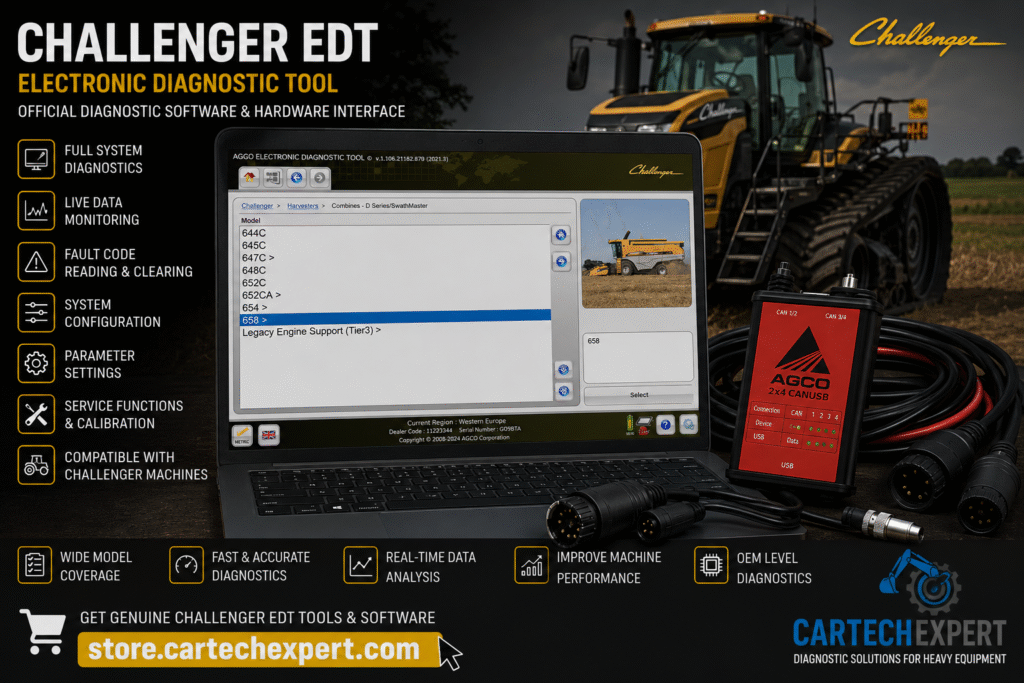
Challenger EDT (Electronic Diagnostic Tool) is the official OEM diagnostic software developed by AGCO Corporation for servicing Challenger agricultural equipment. Designed for dealer technicians and professional repair workshops, EDT provides direct communication with the electronic control systems installed on Challenger tractors, track tractors, combines and agricultural machinery.
Modern Challenger machines rely on advanced electronic systems to manage engine performance, powershift and continuously variable transmissions, hydraulics, precision farming technologies, emissions systems and ISOBUS implement communication. EDT allows technicians to diagnose these systems quickly while reducing machine downtime and improving repair accuracy.
Electronic Diagnostic Tool (EDT) is AGCO’s professional service application used to diagnose electronically controlled Challenger equipment. Through an approved AGCO communication interface, technicians can retrieve Diagnostic Trouble Codes (DTCs), monitor live operating parameters, identify ECUs, configure machine settings and perform supported calibration procedures.
Unlike universal scan tools, Challenger EDT provides dealer-level access to proprietary AGCO electronic systems and advanced service functions.
As Challenger agricultural equipment evolved with electronically controlled engines, hydraulic systems and precision farming technology, AGCO introduced EDT to support professional diagnostics throughout its dealer network. The software continues to support modern electronic platforms while maintaining compatibility with many earlier Challenger models.
| Equipment Category | Typical Coverage |
|---|---|
| MT500 Series | Agricultural tractors |
| MT600 Series | High horsepower tractors |
| MT700 Series | Tracked tractors |
| MT800 Series | Heavy-duty tracked tractors |
| MT900 Series | Articulated tractors |
| Challenger Combines | Supported electronic models |
| Application Equipment | Supported AGCO platforms |
| Controller | Purpose |
|---|---|
| Engine ECU | Fuel injection, emissions and turbocharger management |
| Transmission ECU | Powershift and CVT management |
| Hydraulic ECU | Hydraulic pump and valve control |
| Cab Controller | Climate control and operator functions |
| Display Controller | Machine information terminal |
| ISOBUS Controller | Implement communication |
| Guidance Controller | Auto-steering and precision farming |
| Function | Status |
|---|---|
| Read Diagnostic Trouble Codes | Supported |
| Clear Diagnostic Trouble Codes | Supported |
| Live Data Monitoring | Supported |
| Controller Identification | Supported |
| Parameter Configuration | Supported |
| Calibration Procedures | Supported on compatible models |
| Diagnostic Reports | Supported |
EDT displays live engine speed, coolant temperature, fuel pressure, transmission information, hydraulic pressure, PTO speed, DEF system data, battery voltage and many additional electronic parameters. Live monitoring allows technicians to diagnose intermittent faults that cannot be identified using stored fault codes alone.
Diagnostic Trouble Codes (DTCs) can be retrieved from every supported electronic controller. EDT identifies both active and inactive faults and provides controller information that significantly reduces troubleshooting time.
Hydraulic diagnostic functions include pressure monitoring, valve activation testing, electronic hitch control diagnostics and proportional valve analysis for supported Challenger equipment.
Transmission diagnostics include monitoring clutch pressures, gear engagement, transmission temperature, speed sensors and electronic transmission calibration procedures.
Engine diagnostics support monitoring of fuel injection systems, turbocharger performance, emissions equipment, DEF systems, intake pressure and exhaust aftertreatment depending on engine generation.
EDT provides CAN Bus diagnostics, sensor voltage monitoring, actuator testing, controller communication verification and electrical troubleshooting functions that assist technicians in locating wiring faults efficiently.
Coverage depends on the electronic architecture and supported production year.
Yes. Engine controllers are fully supported on compatible machines.
Yes. Supported equipment equipped with ISO 11783 communication can be diagnosed through EDT.
Programming availability depends on controller compatibility and software authorization.
Yes. Dealer-level software provides advanced manufacturer-specific diagnostic capabilities unavailable through most universal scanners.
Many electronic communication failures originate from poor battery condition, damaged CAN wiring or connector corrosion rather than failed electronic control modules. Always verify battery voltage, grounds and CAN Bus resistance before replacing an ECU.
Using live operating data during actual machine operation remains the most effective method for diagnosing intermittent electronic failures.
Challenger EDT remains the official OEM diagnostic solution for professional servicing of Challenger agricultural equipment. Combining advanced diagnostics, controller communication, calibration functions and live monitoring capabilities, EDT enables technicians to improve repair accuracy while minimizing equipment downtime.
